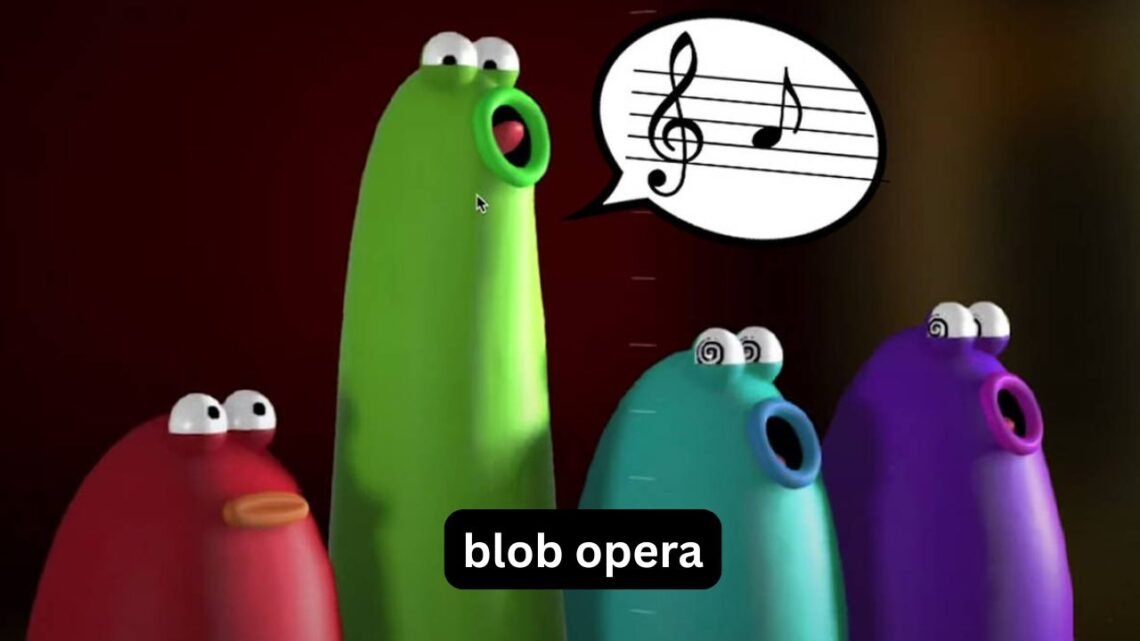
If you search for Blob Opera, you may be expecting a normal browser game with levels, points, and a clear objective. Instead, you get four colorful blobs that sing together when you move them around. That unusual design is exactly what makes the experience memorable—but it can also leave first-time players wondering what they are actually supposed to do.
Blob Opera is an interactive music experiment created by Google Arts & Culture with musician and artist David Li. You control four virtual singers, each representing a different vocal range, and their voices automatically harmonize as you change pitch and vowel sounds. There is no traditional winning condition, so the fun comes from experimenting, composing little melodies, and discovering combinations that sound surprisingly polished.
This guide explains how the Blob Opera game works, where people commonly look for it, how to create better-sounding songs, why it can lag, what “Blob Opera 2” usually refers to, and how to get more out of the experience without treating it like a conventional game.
What Is Blob Opera?
Blob Opera is an interactive web-based musical experience rather than a traditional game.
The basic concept is simple: four animated blobs sing together while you control their vocal sounds. Instead of manually selecting individual musical notes, you interact with the singers and let the underlying system create harmony.
The four voices represent different parts of a traditional vocal ensemble:
- Bass — the lowest voice
- Tenor — a higher male vocal range
- Mezzo-soprano — a mid-to-high female vocal range
- Soprano — the highest voice
The clever part is that you do not have to understand music theory to make something recognizable. Moving one blob changes its vocal behavior while the other voices respond musically.
That makes Blob Opera accessible to someone who has never played a musical instrument.
How Does the Blob Opera Game Work?
The easiest way to understand Blob Opera is to think of it as a four-part vocal playground.
You generally interact with a blob by moving it vertically and horizontally. One direction affects pitch, while another changes the vowel-like sound being produced.
The software then handles the difficult part: keeping the voices working together.
For a beginner, a useful approach is:
- Start with the lowest blob.
- Move it slowly through a few pitches.
- Add the next voice.
- Experiment with the upper voices.
- Change vowel sounds once you have a melody you like.
- Try small movements instead of constantly dragging the blobs around.
The last point matters more than it sounds.
Large, rapid movements can produce unpredictable musical changes. Small movements let you hear how one adjustment affects the whole vocal arrangement.
You Don’t Need to Know Music Theory
This is one of Blob Opera’s strongest ideas.
You can enjoy it without knowing:
- scales
- chords
- vocal notation
- harmony
- musical intervals
- composition techniques
The system does much of the musical coordination for you.
However, understanding one basic idea can improve your results: the lowest voice often provides the foundation for everything above it.
If the bass line sounds stable, the higher voices usually feel more organized. If you make the bass jump around constantly, the entire performance can become chaotic.
Can You Play Blob Opera Online?
Yes. Blob Opera was designed as an online interactive experience, so it is primarily associated with playing directly in a web browser.
People sometimes search for it using phrases such as “Blob Opera game online,” “Blob Opera Crazy Games,” “Blob Opera Lagged,” or “Blob Opera Cool Math Games.”
Those searches can be misleading because Blob Opera is not fundamentally a conventional arcade game that requires a game portal.
If you encounter a third-party page describing Blob Opera as a normal browser game, check what you are actually opening. A page may simply be embedding or discussing the original interactive experience rather than offering a separate version.
For the smoothest experience, a modern browser with hardware acceleration enabled is generally preferable to an old browser or heavily restricted environment.
Blob Opera Songs: How Do You Make Better Music?
There is no single correct song to make in Blob Opera.
That is the point.
Still, some techniques consistently produce more interesting results.
Start With the Bass
Try creating a simple pattern with the lowest voice first.
For example:
- Choose a comfortable low note.
- Move slightly upward.
- Return toward the starting position.
- Repeat the pattern.
- Add the tenor afterward.
You may find that even a three- or four-note pattern sounds surprisingly musical once the other voices enter.
Let the Higher Voices Move Less
A common beginner mistake is moving every blob continuously.
Instead, establish a foundation and allow the upper voices to react around it.
This creates a more controlled sound and makes changes easier to hear.
Experiment With Vowels
The vowel controls are not just cosmetic.
Changing the vocal sound can dramatically alter the character of the same melody. A sequence that sounds playful with one vowel can feel much more dramatic with another.
This gives you another layer of experimentation without requiring additional musical controls.
A Useful Trick: Build Songs in Layers
One of the less obvious ways to use Blob Opera is to treat it like a miniature arranging tool.
Instead of trying to create the entire performance immediately, build it in layers:
Layer 1: Bass foundation
Layer 2: Tenor movement
Layer 3: Mezzo-soprano response
Layer 4: Soprano highlights
This approach makes it much easier to understand what each singer contributes.
It is also useful if you are trying to reproduce a particular musical feeling rather than simply making random sounds.
What Is Blob Opera 2?
“Blob Opera 2” is a search phrase that can cause confusion.
Blob Opera does not have a standard numbered sequel in the same sense as a conventional game franchise where the original is followed by an officially released “2.”
When people search for Blob Opera 2, they may be looking for:
- a newer version
- another Blob Opera experience
- an unofficial game
- a sequel-like project
- updated content
- information about whether a second game exists
It is therefore important not to assume that every page using the phrase “Blob Opera 2” represents an official sequel.
If your goal is simply to experience the original concept, you do not need to treat “2” as a required version.
Why Is Blob Opera So Different From Normal Games?
Traditional browser games usually give you a clear objective.
You might have to:
- reach a level
- beat a timer
- collect objects
- defeat an opponent
- achieve a high score
Blob Opera works differently.
Its reward comes from experimentation.
That makes it closer to an interactive musical toy than a conventional game.
This distinction explains why some people spend five minutes with it while others keep experimenting for much longer. Someone looking for competition may find the lack of objectives strange, while someone who enjoys creative tools can treat the same lack of rules as freedom.
Blob Opera and Educational Use
Blob Opera can also be useful as an informal introduction to vocal music.
A teacher, parent, or student can use it to demonstrate ideas such as:
- high versus low pitch
- vocal ranges
- harmony
- ensemble singing
- melody
- musical experimentation
The advantage is that students can hear the consequences of changing a voice immediately.
Instead of explaining harmony only through notation, you can let someone move the voices and listen to the result.
A Simple Classroom Experiment
Try this exercise:
- Have a student control only the bass.
- Ask another student to control the tenor.
- Add the upper voices.
- Change one voice at a time.
- Ask what changed in the overall sound.
The activity turns an abstract musical concept into something interactive.
Why Does Blob Opera Lag?
If Blob Opera is running slowly, freezing, or responding late, the problem is not necessarily the experience itself.
Browser-based interactive music can use considerably more processing than an ordinary text webpage.
Common causes include:
- too many browser tabs open
- an outdated browser
- limited device memory
- heavy background applications
- browser extensions
- disabled hardware acceleration
- an overloaded computer
- an older mobile device
- network instability during initial loading
How to Reduce Blob Opera Lag
Try these steps in order:
1. Close unnecessary tabs.
Especially close pages running games, video, or other interactive applications.
2. Restart the browser.
A fresh session can release memory consumed by previous pages.
3. Update your browser.
Older browser versions may handle modern interactive experiences less efficiently.
4. Disable unnecessary extensions temporarily.
Privacy tools, script blockers, and other extensions can sometimes interfere with interactive pages.
5. Try another browser.
If the experience works normally elsewhere, the problem may be browser-specific.
6. Restart the device.
This is particularly useful when the computer has been running for a long time.
One useful diagnostic trick is to compare Blob Opera with another interactive web application. If several demanding browser experiences lag, the issue is more likely related to your device or browser than to Blob Opera itself.
Blob Opera on Low-End Devices
If you are using an older laptop or budget computer, you do not necessarily have to give up immediately.
First, reduce the workload around the browser.
Close applications such as:
- video editors
- large downloads
- multiple browser windows
- resource-heavy games
- unnecessary background programs
Then open Blob Opera by itself.
If the page still struggles while other websites work normally, testing another browser can help identify whether the issue is compatibility-related.
On mobile devices, available memory can make an especially noticeable difference when several applications remain open in the background.
Common Blob Opera Mistakes
Blob Opera looks simple, but beginners often make the same mistakes.
Moving All Four Blobs Constantly
This produces a lot of sound but not necessarily a good musical result.
Better approach: establish one voice, then gradually introduce the others.
Making Huge Pitch Changes
Large movements can make the performance feel disconnected.
Better approach: use smaller movements and listen after each change.
Ignoring the Bass
The lowest voice can provide the musical foundation.
Better approach: create a simple bass pattern before experimenting with the soprano.
Expecting a Traditional Game
There may be no score, campaign, or final boss.
Better approach: treat Blob Opera as a creative experiment.
Assuming Every “Blob Opera 2” Page Is Official
Search results can mix the original experience with unrelated or unofficial references.
Better approach: distinguish the original Blob Opera experience from third-party pages and similarly named projects.
Blob Opera vs. Traditional Music Games
| Feature | Blob Opera | Traditional Music Game |
|---|---|---|
| Main goal | Experiment with music | Usually complete objectives |
| Scoring | Not central | Often important |
| Musical knowledge | Not required | Sometimes useful |
| Creativity | Very high | Depends on the game |
| Competition | Minimal | Often present |
| Learning curve | Low | Varies |
| Replay value | Experimentation | Levels, challenges, scores |
This comparison explains why searching for Blob Opera through ordinary game websites can create the wrong expectations.
It is not trying to replace rhythm games. It offers a different kind of interaction.
Three Less-Obvious Things to Try
1. Make a “Call and Response” Pattern
Create a short phrase with one group of voices, then answer it using a different pitch pattern.
You are effectively creating a musical conversation.
This is more interesting than continuously moving every blob at random.
2. Use Silence and Restraint
You do not have to make every voice active all the time.
A quieter arrangement can make the moments when several voices come together feel more noticeable.
The practical lesson is simple: more movement does not automatically mean better music.
3. Recreate a Mood Instead of a Song
Rather than trying to reproduce a famous song exactly, aim for a mood.
For example:
- calm
- dramatic
- playful
- mysterious
- celebratory
Choose slower or faster movements and experiment with the vocal sounds until the overall feeling matches your target.
This approach works particularly well because Blob Opera is designed around interaction rather than precise song transcription.
Is Blob Opera Safe for Kids?
The concept itself is family-friendly and does not require players to communicate with strangers or compete against other users.
For younger children, the main consideration is not the musical interaction but the website environment they use to access it. If they are using a third-party gaming site, parents should understand that the surrounding site may contain content unrelated to Blob Opera.
For a child using it as a creative activity, setting a simple goal—such as creating a short “song” or demonstrating high and low voices—can make the experience more meaningful than unrestricted clicking.
FAQ
Is Blob Opera a real game?
Blob Opera is better described as an interactive musical experiment than a conventional game. It lets users control four virtual singers and create harmonized vocal performances. There is no traditional campaign or standard win condition. The main purpose is exploration and musical creativity.
Can I play Blob Opera online?
Yes, Blob Opera is designed as a browser-based interactive experience. You do not need traditional gaming hardware to experiment with the virtual singers. A modern browser and reasonably capable device should provide a better experience.
What is Blob Opera 2?
“Blob Opera 2” is commonly used as a search query for a possible sequel or newer version, but it should not automatically be treated as the name of an official numbered sequel. Search results can include unrelated or unofficial projects. If you simply want the original Blob Opera experience, you can use the original interactive concept without looking for a “2” version.
Why is Blob Opera lagging?
Lag can result from limited device resources, too many open tabs, browser extensions, an outdated browser, or compatibility issues. Closing background applications and unnecessary tabs is a good first step. Testing another updated browser can help determine whether the problem is specific to your current setup.
Can you make songs with Blob Opera?
Yes. The four virtual singers can be manipulated to create melodies, harmonies, and different vocal textures. You do not need formal music training to experiment with them. Starting with the bass and gradually adding the higher voices usually gives you more control over the result.
Is Blob Opera useful for learning music?
It can provide an informal introduction to concepts such as pitch, vocal range, melody, and harmony. It is not a replacement for structured music education, but its immediate cause-and-effect interaction can make basic musical ideas easier to hear and understand.
Conclusion
Blob Opera stands out because it removes much of the complexity normally associated with making music. Instead of learning an instrument or memorizing musical notation, you can move four colorful singers around and immediately hear how their voices interact.
The best way to approach it is not as a game you have to “beat,” but as a small musical laboratory. Start with the bass, add voices gradually, experiment with vowel sounds, and use controlled movements rather than constantly dragging everything around.
If Blob Opera lag is your problem, reduce browser workload and test your setup before assuming the experience itself is broken. And if you see searches for Blob Opera 2, remember that the phrase does not automatically mean there is an official numbered sequel.
Sometimes the most enjoyable part is simply finding an unexpected combination that sounds good—and then trying to figure out why it worked.