
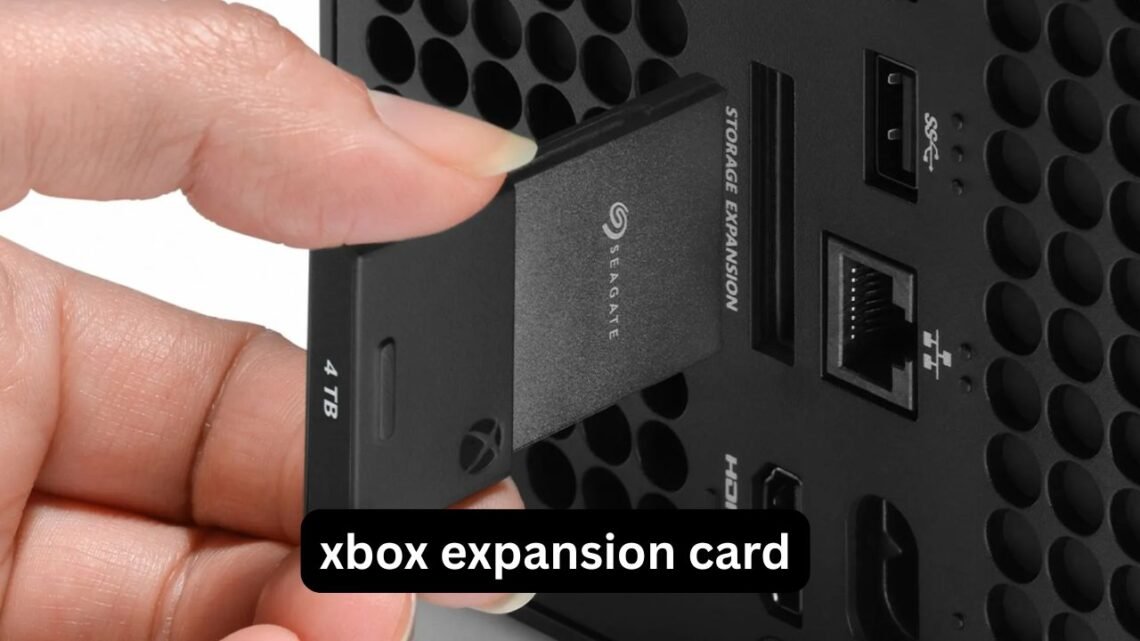
Running out of space on an Xbox Series X or Series S can happen surprisingly quickly. A few large games, a Game Pass library, and several downloadable expansions can leave the internal SSD nearly full, forcing you to delete games you still want to play. That is where an Xbox expansion card becomes useful.
Unlike a normal USB hard drive, an official expansion card plugs directly into the dedicated storage expansion slot on the back of an Xbox Series X or Series S. It is designed to provide the performance needed for games optimized for the current generation, including fast loading and the ability to play those games directly from the added storage. Microsoft currently lists Seagate expansion cards in 1TB, 2TB and 4TB capacities, while the WD_BLACK C50 is available in capacities up to 2TB.
But buying the biggest card is not automatically the right decision. The real question is whether you need 1TB, 2TB or 4TB, and whether a Seagate or WD_BLACK card makes more sense for your Xbox setup. This guide breaks down those differences in practical terms.
What is an Xbox expansion card?
An Xbox expansion card is a dedicated SSD storage device designed for Xbox Series X and Series S consoles.
It connects to the proprietary storage expansion port rather than using USB. The important advantage is that compatible expansion cards are designed to provide performance comparable to the console’s internal SSD, allowing supported games to run directly from the card.
That makes it different from a conventional external USB drive.
A USB drive is still useful for storing games, particularly older Xbox One, Xbox 360 and original Xbox titles. However, games optimized specifically for Xbox Series X|S generally need to be moved to the internal SSD or a compatible expansion card before they can be played.
In simple terms:
- Expansion card: store and play compatible Series X|S games directly.
- USB HDD/SSD: excellent for cheaper bulk storage, but Series X|S optimized games may need to be moved before playing.
- Internal SSD: fastest integrated storage, but limited by the console’s built-in capacity.
For someone with a large current-generation game library, the expansion card is therefore more than just an ordinary storage accessory.
Seagate Xbox expansion card: what you get
Seagate was one of the original storage partners for Xbox Series X|S expansion storage.
The Seagate Storage Expansion Card is officially designed for Xbox Series X and Series S and uses the console’s dedicated expansion slot. Microsoft currently lists 1TB, 2TB and 4TB versions, giving buyers considerably more capacity at the high end than some competing options.
The main reason to consider Seagate is simple: capacity choice.
Seagate 1TB
A 1TB card makes sense if the internal storage is only slightly too small for your normal library.
It can be useful for players who:
- Regularly rotate games.
- Mainly use Game Pass rather than keeping dozens of permanent installs.
- Already have a USB drive for older games.
- Want the smallest upfront storage upgrade.
The downside is that modern AAA games can consume a significant amount of space, so 1TB can eventually feel less generous than it sounds.
Seagate 2TB
The 2TB Seagate Xbox expansion card is a more comfortable middle ground.
For many players, it provides enough additional room to keep a substantial collection of large Series X|S games installed without constantly managing storage.
It is particularly useful if you frequently switch between multiplayer games, open-world titles and Game Pass downloads.
Seagate 4TB
The Seagate 4TB Xbox expansion card is aimed at people who want to minimize storage management.
Microsoft and Seagate list a 4TB model, and Seagate describes the card as providing up to 4TB while maintaining the performance characteristics required for Xbox Series X|S gameplay.
A 4TB card can be especially practical if you:
- Have a large digital library.
- Frequently download large games.
- Share the console with other players.
- Want to keep Game Pass games installed.
- Dislike deleting and reinstalling games.
The important point is that 4TB is about convenience as much as capacity. You are paying for the ability to stop thinking about storage as often.
WD_BLACK C50 Xbox expansion card explained
The WD_BLACK C50 is Western Digital’s officially licensed Xbox expansion card.
It uses the Xbox expansion slot and is designed around Xbox Velocity Architecture. The manufacturer states that it provides performance comparable to the Xbox Series X|S internal storage for supported games.
Current WD_BLACK C50 specifications list:
- 512GB
- 1TB
- 2TB
The 2TB model is listed under model number WDBMPH0020BNC, while the card is compatible with Xbox Series X|S.
That makes the WD_BLACK C50 particularly relevant when someone searches for a WD Xbox expansion card 2TB.
It also supports Quick Resume integration, allowing games stored on the expansion card to participate in the Xbox Series X|S experience rather than behaving like ordinary archived files.
Seagate vs WD_BLACK C50
The choice between a Seagate Xbox expansion card and WD_BLACK C50 is not simply about which brand makes better SSDs.
Both are designed specifically around Xbox Series X|S expansion storage.
| Feature | Seagate Expansion Card | WD_BLACK C50 | |
|---|---|---|---|
| Xbox Series X | S | Yes | Yes |
| Dedicated expansion slot | Yes | Yes | |
| Series X | S optimized games | Designed for direct play | Designed for direct play |
| 1TB | Yes | Yes | |
| 2TB | Yes | Yes | |
| 4TB | Yes | No | |
| Quick Resume integration | Yes | Yes | |
| Main advantage | Wider capacity range | Strong 2TB alternative |
The biggest practical difference is capacity selection.
If you specifically want 4TB, Seagate is the obvious route because its current Xbox expansion range includes a 4TB model.
If you’re looking for a 2TB WD_BLACK Xbox expansion card, the C50 provides an officially licensed alternative with Xbox-specific integration.
Is a 2TB Xbox expansion card enough?
For many players, yes.
But storage requirements vary dramatically depending on how you use your console.
Imagine a Series X owner who keeps around 15–20 games installed. If several are large modern titles, the internal drive can become crowded quickly. Adding 2TB gives that player considerably more breathing room without the extra expense and physical footprint associated with constantly managing multiple USB drives.
A 2TB card is particularly sensible when your problem is storage management rather than permanent archiving.
There is also a less obvious benefit: reducing the number of times you need to uninstall and reinstall large games can save time and bandwidth. If your internet connection has download limits or relatively slow download speeds, that convenience can matter more than the storage specification itself.
When does a 4TB Xbox expansion card make sense?
A 4TB card is easier to justify when your Xbox is effectively a long-term game library rather than a machine where you keep only a handful of active games.
Consider a player who:
- Uses Game Pass regularly.
- Downloads games instead of buying discs.
- Plays several multiplayer titles.
- Keeps single-player games installed for occasional replay.
- Shares the console with family members.
For that type of setup, 4TB can dramatically reduce storage housekeeping.
However, if you normally play three or four games at a time and uninstall everything else, spending more for 4TB may not provide much practical benefit.
The useful question is not “How much storage can I afford?” but “How often do I currently have to delete games because I am out of space?”
Xbox expansion card vs USB SSD
This is one of the most important distinctions to understand before buying.
A USB 3.0-or-newer external drive can be connected to Xbox Series X|S and can provide inexpensive additional storage. Seagate notes that external USB drives can store Series X|S optimized games, but those optimized games generally cannot be played directly from the USB drive.
Older compatible games are different.
External USB storage can be used to store and play many Xbox One, Xbox 360 and original Xbox games.
So a practical setup can look like this:
Internal SSD + expansion card: active Series X|S games.
USB HDD/SSD: older games and Series X|S games kept as a game vault.
This can be a smarter arrangement than buying an enormous expansion card if you have hundreds of older titles but only a smaller collection of current-generation games.
A useful storage strategy for Xbox owners
Instead of thinking about storage as one giant pool, divide your library into three groups.
Group 1: Games you play now
Keep these on the internal SSD or expansion card.
These are games where fast access matters because you launch them frequently.
Group 2: Series X|S games you want ready
Use the expansion card for these.
They remain immediately playable without requiring a transfer from USB storage.
Group 3: Games you rarely play
A USB HDD or SSD can be used as a cheaper archive.
When you want to return to a Series X|S optimized title stored there, transfer it back to the internal SSD or expansion card.
This approach can save money while still giving you a large overall library.
Three practical insights people often miss
1. Capacity is not the same as usable space
A card marketed as 2TB does not mean the Xbox will show exactly 2,000GB of free game storage.
Manufacturers define 1TB as one trillion bytes, and actual usable capacity can be lower because of formatting and the operating environment. WD_BLACK explicitly notes this in its specifications.
So don’t calculate your library using the advertised number as if every byte were available for games.
2. An expansion card can be moved between consoles
This is useful if you have more than one Xbox Series X|S.
Seagate states that its Storage Expansion Cards are portable and can be used on another Series X|S console after connecting the card and signing into the appropriate Xbox profile or providing the required game disc.
That makes the card more useful than a permanently installed storage upgrade.
3. Don’t buy based only on SSD terminology
An ordinary NVMe SSD is not automatically an Xbox expansion card.
The Series X|S expansion slot is designed for compatible expansion cards. A normal PC NVMe drive cannot simply be inserted into the Xbox and expected to work.
That is why compatibility matters more here than the usual PC SSD specifications.
Common mistakes when buying an Xbox expansion card
Buying a normal USB SSD by mistake
A USB SSD can be excellent for storage, but it is not a replacement for an Xbox expansion card when you need to play Series X|S optimized games directly from the additional storage.
Paying for 4TB when you do not need it
More capacity sounds attractive, but if you only maintain a small active library, a 2TB card may already solve your problem.
Ignoring current pricing
Expansion-card pricing can change significantly between retailers and during promotions. A Seagate Xbox expansion card deal can make a higher-capacity model much more attractive than its normal price suggests.
The same applies to WD_BLACK C50 discounts.
Rather than comparing only the sticker price, calculate the cost per usable terabyte and consider how much storage you actually need.
Assuming all Xbox storage works identically
It does not.
The distinction between internal storage, Xbox expansion cards and USB storage is important because Series X|S optimized games have different requirements.
Which size should you choose?
A simple way to decide:
Choose 1TB if:
You have a modest library and mainly need extra breathing room.
Choose 2TB if:
You regularly keep many modern games installed and want a balanced upgrade.
Choose 4TB if:
You maintain a very large digital library and want to minimize deleting, transferring and reinstalling games.
For many households, 2TB is the point where storage management becomes considerably easier without going all the way to the largest available option.
How to install an Xbox expansion card
Installation is intentionally straightforward.
- Turn on your Xbox Series X or Series S.
- Remove the protective cover from the expansion card.
- Locate the dedicated storage expansion port on the rear of the console.
- Insert the card firmly into the slot.
- Allow Xbox to detect and configure it.
- Follow the on-screen setup instructions.
WD’s setup instructions similarly direct users to remove the card cover and plug the C50 into the storage expansion slot on the rear of the console.
There is no need to open the Xbox or install the card internally.
Can you play games directly from the expansion card?
Yes. That is one of the main reasons to buy a compatible Xbox expansion card.
The Seagate card is engineered to maintain the same peak performance characteristics as the console’s internal SSD, while the WD_BLACK C50 is designed to leverage Xbox Velocity Architecture for compatible Series X|S games.
This is the key advantage over using a standard USB storage drive as your primary Series X|S game library.
Final verdict: what should you look for?
An Xbox expansion card is one of the most straightforward ways to solve the storage limitations of the Xbox Series X|S.
The Seagate Xbox expansion card has the advantage of offering capacities from 1TB through 4TB, making it the option to consider when maximum capacity is the priority.
The WD_BLACK C50 Xbox expansion card is a strong alternative for buyers focused on the 1TB or 2TB range and wanting an officially licensed Xbox storage solution. Its current product specifications include a 2TB model and Xbox Series X|S compatibility.
For most players, the decision comes down to three things: how many games you keep installed, how often you want to manage storage, and the price you find at the time of purchase.
If 1TB feels restrictive, move to 2TB. If you want a large library available without constant deleting and transferring, 4TB offers much more breathing room. And if your goal is simply cheap bulk storage, remember that a USB drive can complement an expansion card rather than replace it.
FAQ
Is the Seagate Xbox expansion card worth it?
It can be useful for Xbox Series X|S owners who need additional storage for games they want to play directly from the added drive. Seagate’s expansion card is designed to match the peak performance characteristics of the console’s internal SSD. The available 1TB, 2TB and 4TB capacities also make it easier to choose based on the size of your library.
Does WD_BLACK C50 work with Xbox Series X and Series S?
Yes. The WD_BLACK C50 is designed for Xbox Series X|S and uses the console’s dedicated expansion slot. Its specifications include 512GB, 1TB and 2TB versions, with the 2TB model providing substantial additional capacity for modern games.
Can you play Xbox Series X|S games from a USB SSD?
Generally, Series X|S optimized games stored on a standard USB drive cannot be played directly from that drive. They can remain there as storage, but compatible titles normally need to be transferred to the internal SSD or an Xbox expansion card for gameplay. Older compatible Xbox games can be played directly from external USB storage.
Is a 2TB Xbox expansion card enough?
For many gamers, 2TB provides a useful balance between capacity and cost. It gives you considerably more room for large modern games without requiring the maximum 4TB option. Your actual requirement depends on how many games you keep installed and whether you use a USB drive for archived titles.
Is there a 4TB WD_BLACK Xbox expansion card?
The current WD_BLACK C50 specifications list capacities up to 2TB. Seagate, by comparison, currently offers a 4TB Storage Expansion Card for Xbox Series X|S. Therefore, buyers specifically searching for a 4TB Xbox expansion card should pay attention to the manufacturer’s stated capacity rather than assuming every Xbox expansion-card brand offers the same sizes.
Can an Xbox expansion card be used on another Xbox Series X|S?
Yes. Seagate states that its expansion cards are portable and can be used with another Xbox Series X|S console after the appropriate account or game-access requirements are met. This makes an expansion card convenient for people who use multiple compatible consoles.
Conclusion
The right Xbox expansion card depends less on the brand name and more on how you actually use your console. A 2TB card is a practical choice for many players who want a substantial storage upgrade, while a 4TB Seagate card is aimed at large libraries where deleting games has become a regular chore. The WD_BLACK C50 provides another officially licensed option, particularly in the 1TB and 2TB range.
Before buying, check your current storage usage, decide which games need to remain immediately playable, and compare the price per terabyte rather than simply choosing the largest number. That approach can turn an expensive storage upgrade into a much more sensible long-term purchase.