
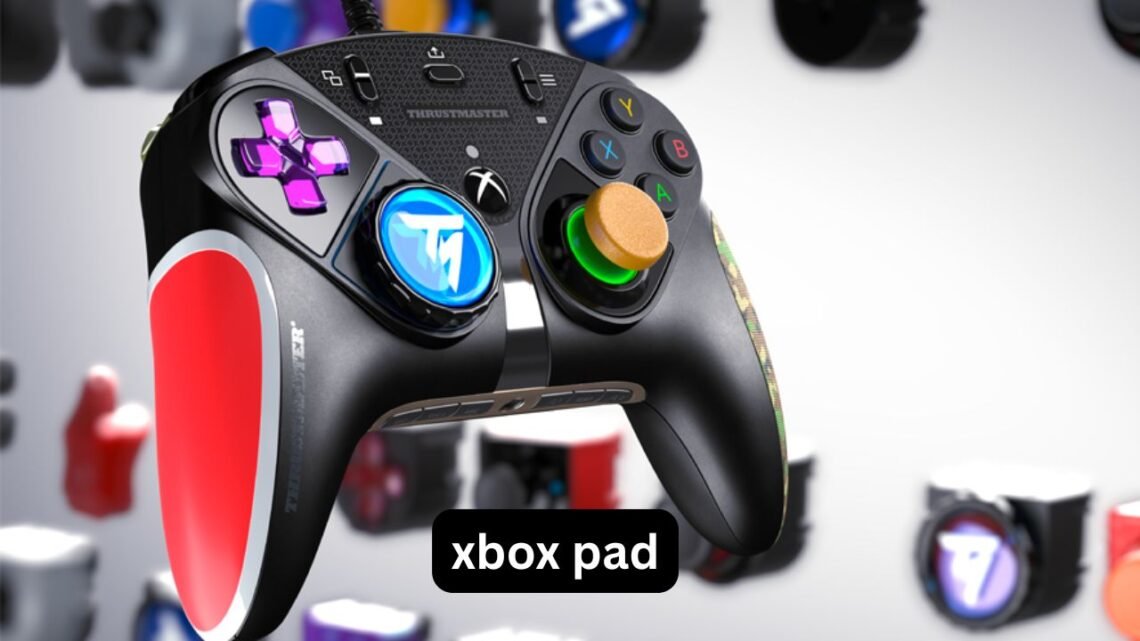
Buying an xbox pad sounds simple until you start comparing wireless models, PC compatibility, rechargeable batteries, custom designs, and prices. Then the small differences suddenly matter. A controller that feels excellent on an Xbox can behave differently on a PC, while a cheap wireless model may become frustrating if its battery, connection, or buttons are unreliable.
The good news is that choosing the right controller does not require knowing every technical specification. What matters most is how you plan to use it. Do you want a wireless Xbox pad for casual gaming, a controller for PC gaming, a rechargeable setup for long sessions, or a custom Xbox pad that looks and feels more personal?
This guide breaks those choices down in practical terms. You will learn what to check before buying, how Xbox controllers work with PC, when a rechargeable battery is worthwhile, what affects Xbox pad price, and which common mistakes can turn an apparently good deal into an expensive replacement.
What Is an Xbox Pad?
An Xbox pad is a game controller designed primarily for Xbox consoles, with modern Xbox controllers also widely used with Windows PCs and other compatible devices.
The familiar layout includes:
- Two analog sticks
- A directional pad
- A, B, X and Y face buttons
- Shoulder buttons and triggers
- Menu and view controls
- A central Xbox button
The exact features vary between models. Some focus on affordability and everyday gaming, while others add programmable buttons, adjustable controls, textured grips, interchangeable components, or other features aimed at competitive players.
For most people, the best controller is not necessarily the one with the longest feature list. It is the one whose connection, battery system, ergonomics and controls suit the games they actually play.
Wireless Xbox Pad vs Wired Controller
The biggest decision for many buyers is whether to go wireless.
A wireless Xbox pad removes the cable between you and the console or computer. This is particularly useful when playing from a sofa or when your PC is connected to a television.
Advantages of wireless
- Less cable clutter
- Greater freedom of movement
- Convenient couch gaming
- Easier setup for console gaming
- Cleaner desk arrangement
There is one trade-off: wireless controllers need power and depend on a wireless connection.
A wired controller does not have that particular problem. You can simply connect it and continue playing without worrying about battery charge.
Which is better?
For a permanent desk setup, wired can be perfectly practical. For living-room gaming, wireless is usually more convenient.
Competitive players should also consider connection consistency rather than assuming wireless is automatically superior. If you already have a reliable wireless setup, the difference may be insignificant in normal play. For extremely latency-sensitive gaming, however, a wired connection can still be attractive.
Using an Xbox Pad for PC Gaming
An Xbox pad for PC is one of the easiest controller setups because Windows has strong support for Xbox-style controllers.
Before buying, check exactly how the controller connects:
- USB cable – Plug it directly into the computer.
- Bluetooth – Useful for compatible PCs and laptops.
- Xbox Wireless – Designed around Microsoft’s wireless ecosystem and may require compatible hardware on a PC.
- Multiple connection modes – Some controllers support more than one method.
Bluetooth is convenient, but compatibility and features can vary by controller and computer. A controller that supports Bluetooth does not necessarily provide identical functionality over every connection method.
A practical PC example
Suppose you mainly play racing games at your desk but occasionally move your PC to the TV.
A controller with both wireless and wired options can make more sense than buying a controller optimized for only one setup. You can use wireless when sitting farther away and connect by USB when charging or when you want a direct connection.
That flexibility is often more valuable than paying extra for features you will never use.
Xbox Pad Battery Options Explained
Battery design is one of the easiest things to overlook.
Some controllers use replaceable batteries, while others can be paired with a rechargeable battery pack or charging accessory. The choice affects both convenience and long-term cost.
Replaceable batteries
The advantage is simplicity. When the batteries run out, you replace them and continue playing.
The disadvantage is ongoing battery consumption and the need to keep replacements available.
Rechargeable Xbox pad battery
A rechargeable setup is convenient for people who play frequently. Instead of repeatedly buying disposable batteries, you recharge the controller and use it again.
However, there is an important detail that buyers sometimes miss: a rechargeable battery does not automatically mean the controller can charge in every situation exactly as expected.
Check:
- Battery compatibility
- Charging method
- Charging cable
- Whether the battery remains installed during charging
- Expected play time
- Whether the battery is included or sold separately
A useful buying habit
If two controllers cost almost the same but one requires you to purchase a separate battery solution, calculate the complete setup price rather than comparing controller prices alone.
The cheaper controller can become the more expensive purchase after accessories are added.
Do You Need an Xbox Pad Charger?
An Xbox pad charger can be useful if your controller uses a rechargeable battery system.
Charging docks are especially convenient because you can place the controller in its dock after playing rather than searching for a cable when the battery is empty.
But a charging dock is not automatically necessary.
If you are comfortable plugging in a USB cable, a dedicated dock may provide little practical benefit. Consider one if:
- You regularly forget to charge the controller.
- You want a permanent charging location.
- Multiple controllers need charging.
- You prefer keeping cables off your desk or entertainment unit.
Before purchasing a charger, verify that it is compatible with your specific controller and battery setup. This is more important than buying based solely on appearance or advertised charging speed.
What Determines Xbox Pad Price?
Xbox pad price can vary considerably depending on the model and features.
The main factors include:
1. Build quality
Controllers made with better materials and tighter components can cost more. A sturdier build may matter if the controller gets heavy use every week.
2. Wireless technology
Wireless capability can increase the price compared with a basic wired controller.
3. Battery system
A controller supplied with a rechargeable solution can cost more initially than one designed around replaceable batteries.
4. Customization
Custom controllers may cost substantially more because you are paying for personalization, specialized components, or both.
5. Advanced controls
Extra buttons, adjustable triggers, interchangeable parts and additional configuration options can push prices higher.
6. Brand and model
Two controllers can have similar specifications but different prices because of brand positioning, support, availability and included accessories.
The important lesson is to compare the complete package, not just the headline price.
Custom Xbox Pad: Is It Worth It?
A custom Xbox pad can mean different things.
Some buyers want a personalized exterior, colors or artwork. Others want functional customization such as alternative thumbsticks, paddles, trigger adjustments or interchangeable components.
These are very different reasons to buy a custom controller.
If personalization is your priority, appearance may justify the additional cost. If performance is the goal, concentrate on the actual controls and ergonomics rather than the cosmetic design.
One overlooked issue
Customization can make replacement harder.
If a standard controller becomes faulty, finding a replacement is generally straightforward. A heavily customized controller may involve proprietary parts, special configurations or a more complicated repair process.
For that reason, check the warranty and return policy before spending significantly more on customization.
How to Choose an Xbox Pad for Different Games
Your favorite games should influence your choice.
For racing games
Look for:
- Comfortable triggers
- Accurate analog control
- Firm grip
- Good trigger resistance
Racing games often make heavy use of triggers, so their feel matters more than having numerous extra buttons.
For shooters
Consider:
- Stick precision
- Comfortable thumbstick height
- Trigger responsiveness
- Stable grip
If you play for several hours, ergonomics can matter more than small differences in specifications.
For platformers
The directional pad deserves more attention.
Players who frequently use precise directional inputs may prefer a controller with a D-pad that feels clear and consistent rather than simply choosing the cheapest option.
For casual gaming
You probably do not need premium features.
A comfortable controller with dependable connectivity and a sensible battery solution may be a better use of money than paying extra for programmable controls you rarely touch.
Three Less-Obvious Things to Check Before Buying
Many controller comparisons focus on specifications. In everyday use, three less obvious factors can matter just as much.
1. How the controller feels after an hour
A controller can feel fantastic for five minutes and uncomfortable after a long gaming session.
Pay attention to:
- Hand position
- Thumb reach
- Trigger comfort
- Grip texture
- Overall weight
Long-session comfort is difficult to judge from a specification sheet.
2. Your charging routine
Battery life is not just about the advertised number of hours. Think about how you actually play.
If you usually finish gaming and immediately put the controller away, a charging dock may be convenient. If you keep the controller near your PC, plugging in a cable may be just as easy.
Your routine should determine the charging solution—not the other way around.
3. The total cost after accessories
A controller listed at a lower price can require a separate battery, cable or wireless adapter.
Before purchasing, calculate:
Controller + required accessories + replacement/charging costs
This simple calculation can reveal that two apparently different price points are much closer than they first appear.
Common Xbox Pad Buying Mistakes
Buying based only on price
The cheapest controller is not necessarily the best value. If you replace it quickly because of poor durability or uncomfortable controls, the initial saving disappears.
Assuming every wireless controller works identically on PC
Connection methods differ. Always verify whether the controller supports the connection you intend to use.
Ignoring battery requirements
Check whether the controller includes a battery solution and how it charges.
Paying for features you will not use
Programmable controls can be useful, but they are unnecessary for many casual players.
Choosing appearance over comfort
A custom design may look excellent while offering no improvement to the actual gaming experience.
Forgetting about warranty support
A controller contains mechanical components that receive repeated physical use. Warranty coverage and return conditions deserve attention before purchase.
How to Make Your Xbox Pad Last Longer
Even a good controller benefits from basic care.
- Avoid dropping it or throwing it onto hard surfaces.
- Keep food and liquids away from the controls.
- Do not pull aggressively on charging cables.
- Store the controller somewhere dry.
- Clean the exterior periodically with an appropriate method.
- Avoid forcing analog sticks or buttons beyond their normal movement.
- Disconnect cables by gripping the connector rather than pulling the wire.
One particularly useful habit is to avoid leaving a charging cable under tension. Repeated sideways pressure on the connector can eventually create connection problems even when the controller itself remains functional.
Should You Buy a Premium or Basic Xbox Pad?
Think about how frequently you play.
| Type of player | What to prioritize |
|---|---|
| Occasional gamer | Comfort and reliability |
| Regular console gamer | Wireless convenience and battery setup |
| PC gamer | Connection compatibility |
| Competitive player | Controls, responsiveness and ergonomics |
| Racing fan | Trigger and stick feel |
| Customization enthusiast | Personalization and compatible components |
| Multi-platform player | Broad device compatibility |
A premium controller makes more sense when its additional features solve a real problem for you. Otherwise, a simpler model can provide the same basic gaming experience without unnecessary expense.
FAQ
Can I use an Xbox pad wirelessly with a PC?
Yes, compatible Xbox controllers can connect to PCs wirelessly using supported wireless technologies. The exact connection method depends on the controller and the computer’s hardware. Check the controller’s supported connection options before buying an adapter or accessories.
How long does an Xbox pad battery last?
Battery life depends on the controller, battery type, usage and connection method. Wireless features and other functions can affect how frequently it needs charging or battery replacement. Rather than relying only on an advertised figure, consider whether the controller fits your normal gaming routine.
Is a rechargeable Xbox pad battery worth it?
For frequent players, rechargeable batteries can be convenient and reduce the need to repeatedly buy disposable batteries. Occasional players may find replaceable batteries perfectly adequate. The best choice depends on how often you play and whether you prefer charging or swapping batteries.
Why are custom Xbox pads more expensive?
Custom controllers can cost more because of personalized finishes, modified components, additional controls or specialized construction. Cosmetic customization generally adds a different type of value than performance customization. Before paying extra, decide whether you want appearance, functionality or both.
Do I need an Xbox pad charger?
Not necessarily. A compatible charging cable may be enough for many users, while a charging dock can make storage and charging more convenient. The key is to confirm that the charger works with your exact controller and battery configuration.
What should I check before buying an Xbox pad for PC?
Check connection compatibility first, especially if you want Bluetooth or another wireless method. Then consider comfort, battery requirements, button layout and the accessories included in the box. Looking at the complete setup cost is more useful than comparing controller prices alone.
Conclusion
Choosing an Xbox pad is less about finding the controller with the most features and more about matching the controller to the way you actually play. Wireless connectivity can make living-room gaming easier, while PC users should pay close attention to connection support. A rechargeable battery can simplify regular gaming, and a charger or dock can improve convenience when it fits your routine.
If you are comparing prices, remember to consider the complete setup—including batteries, charging accessories and any required adapters. And if you are considering a custom Xbox pad, decide whether you are paying for something you genuinely value.
The best purchase is ultimately the controller that feels comfortable, connects reliably and fits your gaming habits without making you pay for features you will never use.